
The operating system
of the future
One computer. Every application. An assistant that can run it for you. And a system that undoes a bad update by itself.
Every line of TUR is public. Read it, fork it, make it better — this operating system is meant to be built by many hands.
Why TUR
Today your applications decide which computer you can use. TUR is built on a different idea: the computer should adapt to you.
Some applications need Windows, some need Linux, some live on your phone, and none of them know about each other. When something goes wrong, the computer tells you nothing useful, and an update can leave it unable to start.
- 01You should be able to run the application you need, wherever it came from.
- 02You should be able to ask your computer to do something, in your own words, and have it done.
- 03Your computer should explain itself when something fails, and repair itself when it can.
- 04A bad update should undo itself.
- 05And it should stay yours: private by default, with nothing collected behind your back.
Every application, in one place
You ask for an application.
TUR works out the best way to run it.
It shows up as an ordinary window, in one launcher, on one desktop. TUR does not pretend: compatibility is measured application by application and published, including what does not work and why.
One application centre
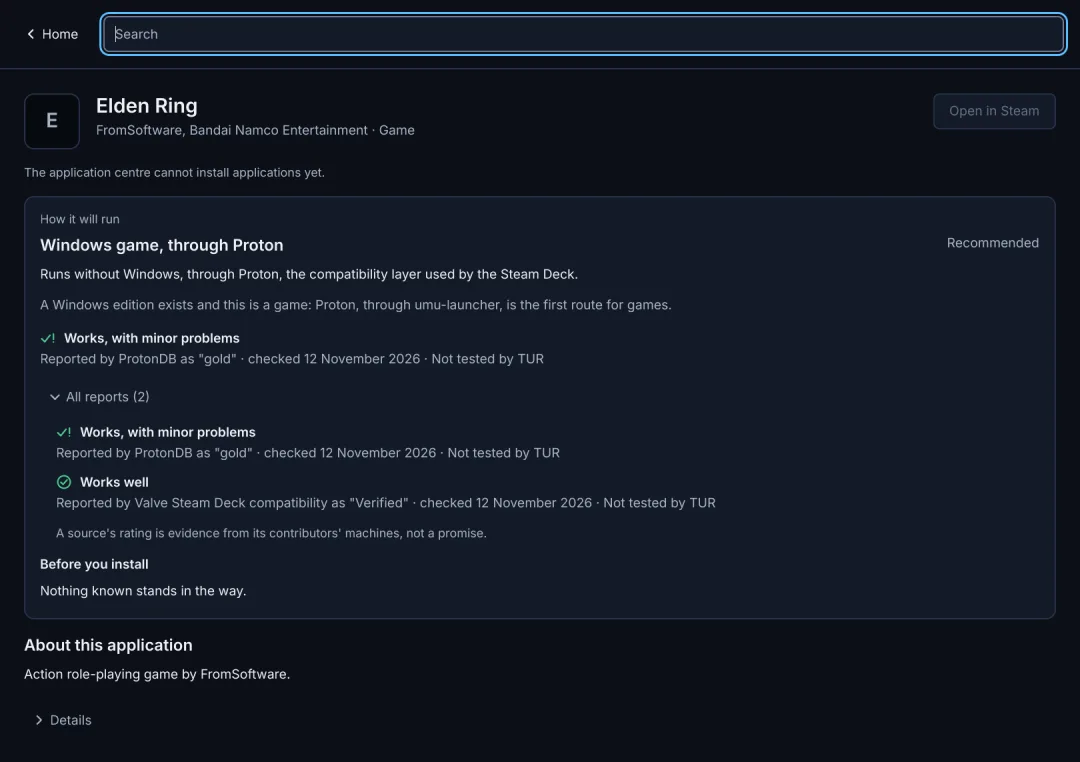
Every store brought together. You search once, and TUR shows where an application is available, how it will run, and who says it works. Stores that belong to someone else, Google Play among them, are offered as a guided opt-in with your own account.
- The route, explained. Native, Proton, compatibility layer or a Windows guest, and why that one was chosen.
- Evidence, with its source. Every rating says who reported it, when, and whether TUR has tested it itself.
- A plain answer when it cannot. If nothing can run an application, TUR says so and offers what will work instead.
A system that looks after itself
A bad update undoes itself.
The operating system is a sealed image. An update is installed alongside the running system; if the new one fails to start properly, TUR returns to the previous one by itself. A few failures cannot be caught automatically, and the design lists them.
Rolls back on its own
A new version that fails its health check, crashes the login screen, cannot mount its disk, panics or hangs is replaced by the previous one.
Tells you what happened
Installation, start-up and updates report in plain language. Every failure has a stable code, an explanation, and a safe next step.
Diagnostics you can hand over
One command produces a support bundle with personal details removed. Nothing is uploaded unless you choose to share it.
Your data is protected
Including data that belongs to another operating system on the same machine. TUR refuses an unsafe write rather than risk it.
Light by design
TUR starts as a fast, clean desktop. Windows, Android and the assistant cost nothing until you use them, and step back when you stop.
Private by default
Nothing is collected silently. Nothing leaves your computer unless you decide it should.
update and failure scenarios proven in a virtual machine on every change
for a broken version to be replaced by the previous one
left on disk after a power cut during an update
Not yet shown on real hardware or with Secure Boot, and nothing tells the user on screen yet. Read the report.
Your assistant
P@x can do what you can do.
P@x is the assistant built into TUR. Run it entirely on your own computer with local AI, or add your own key from a provider you choose, and speak or type to your computer to have things done.
Operates every ecosystem
It opens and operates applications from every ecosystem, manages files, changes settings and installs software.
Fixes problems
It investigates, explains the cause in plain language, repairs it, and checks that the repair held, running the same commands a support engineer would.
Shows you how
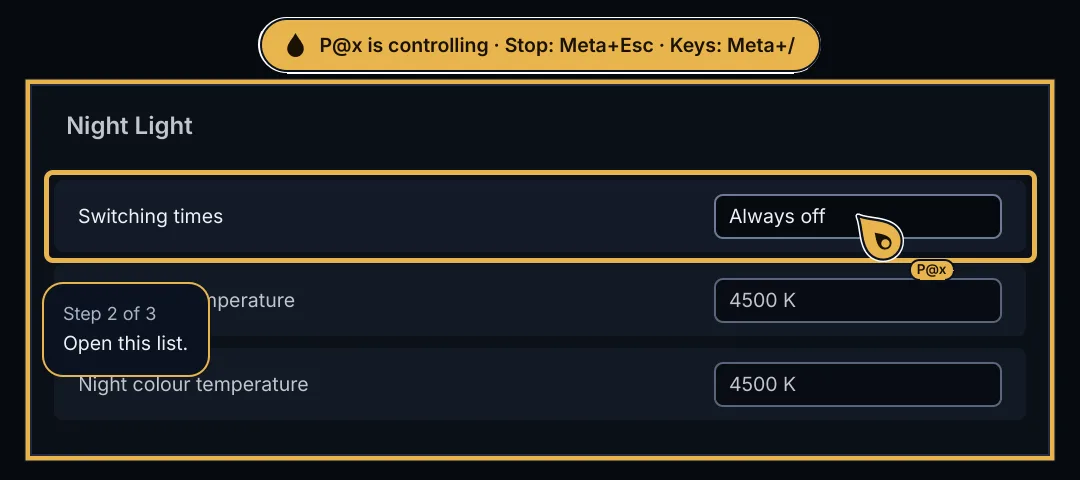
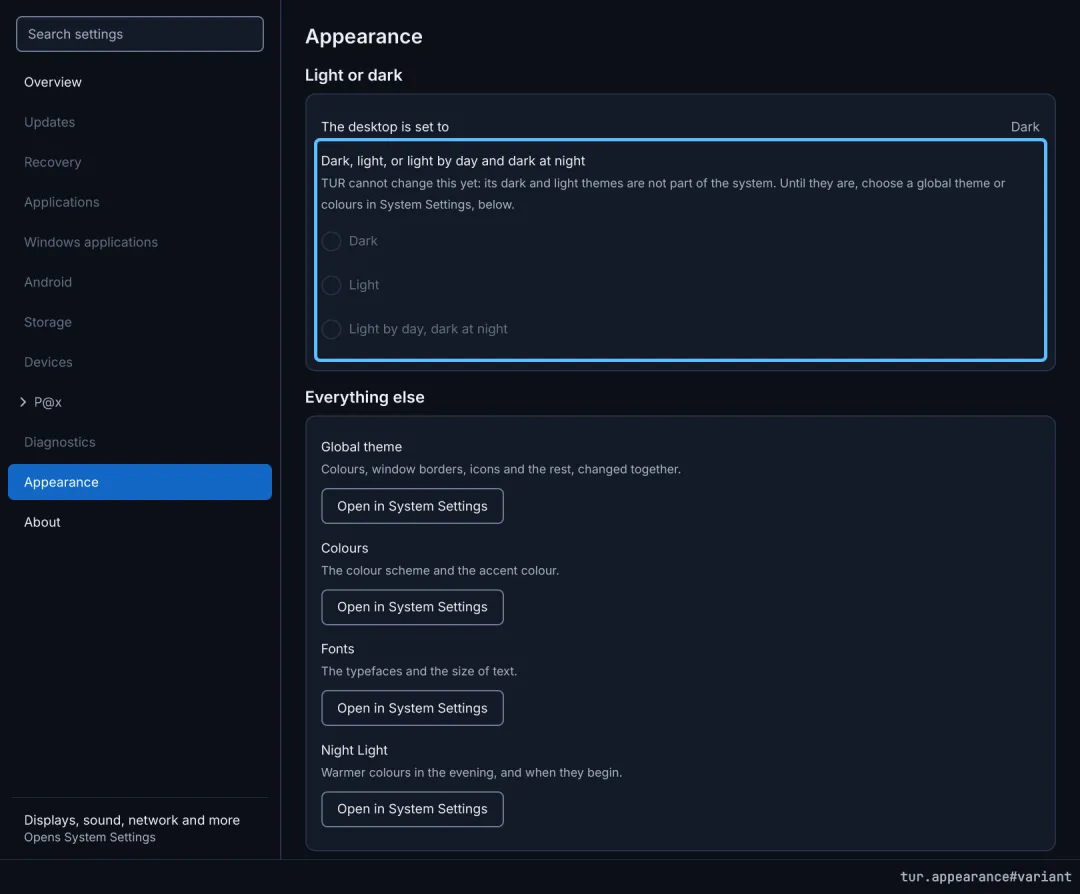
Ask where a setting is and it opens the right page and points at the exact line, or does it for you. Every setting in TUR has an address.
Remembers, and it is optional
A private, local memory of your preferences and of what worked; reminders and scheduled tasks. P@x is off until you turn it on, and TUR is complete without it.
Local AI, built in
TUR can run AI models on your own computer. No account, no key, and nothing you ask leaves the machine. Choose a model in the application centre; TUR shows what each one is good at, how much memory it needs, how fast it will be on your computer and what its licence allows, and recommends one that fits. Speech recognition and speech run locally too, so the assistant can work fully offline. Local AI is off until you switch it on.
Design; not built yet.
You stay in charge
An assistant that can do anything needs limits you can trust, so they are built into the system, not left to the AI's judgement.
Things that can be undone.
Sending, buying, deleting and installing.
Repairs that need administrator rights: a short session, once.
Disks, start-up, firmware and encryption, through a prompt P@x cannot see or touch.
Everything it does is logged, and you can always see when it is watching or acting.
How P@x is protected against being misled by what it reads: the AI control layer design.
Built and tested
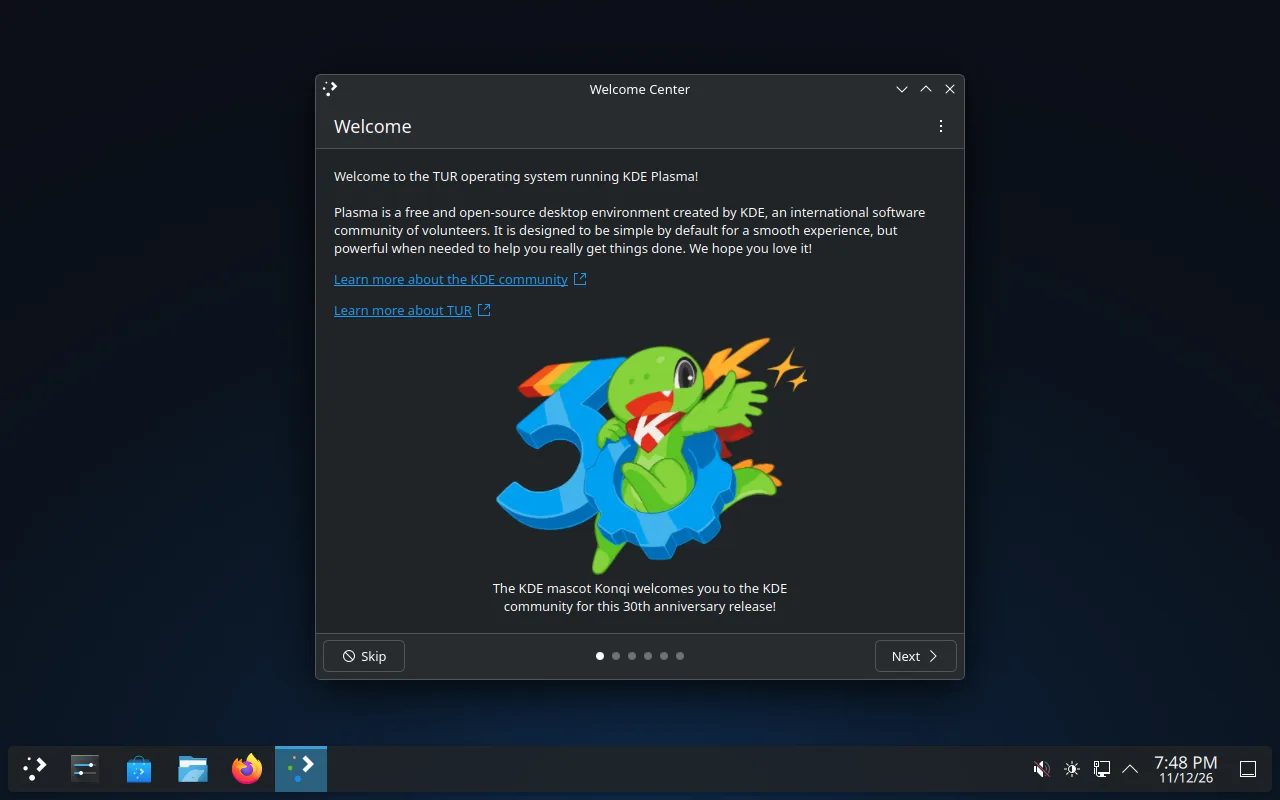
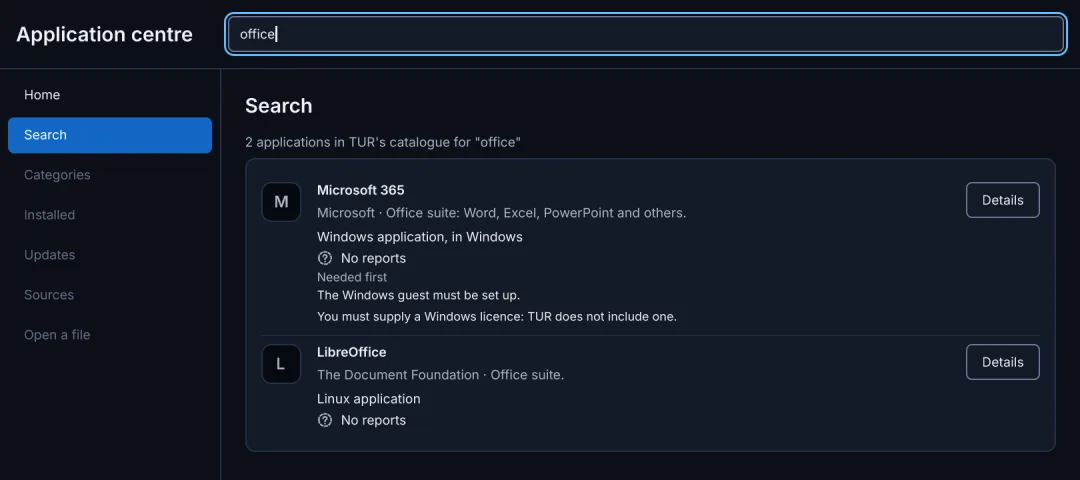
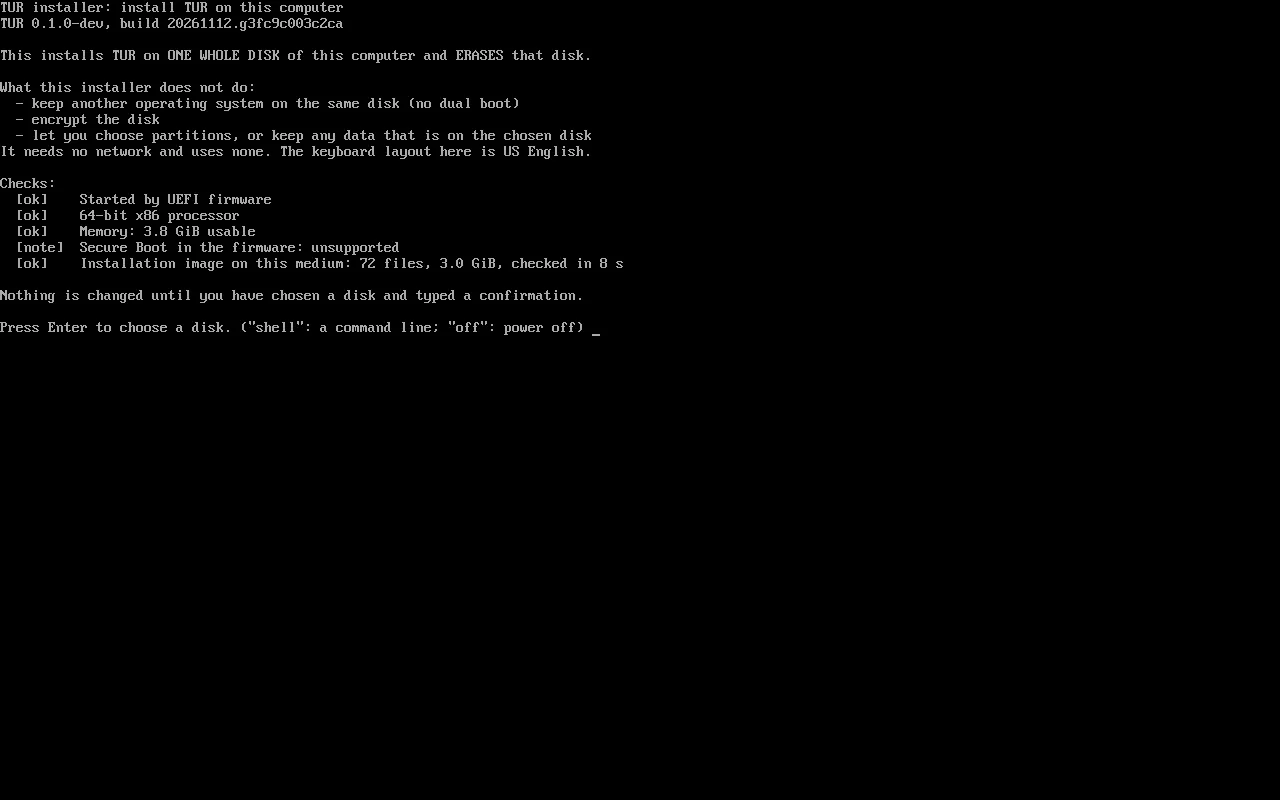
Real screens, from real test runs.
Nothing here is a mock-up. Every picture comes from TUR's continuous integration: the image is built, installed to a disk and booted in a virtual machine on every change, and the interface is checked by screenshot tests in both themes.

Where TUR is today
Honest status.
TUR is pre-alpha. There is nothing to install yet. The design is in place and the first components are being built and tested. The README on GitHub is updated as work lands.
Operating-system image
Boots in a VMBuilds reproducibly, installs to a disk and boots to a graphical login in a virtual machine on every change. Not yet tested on real hardware.
TUR's own programs
In the imageEleven programs run on the installed system with SELinux enforcing: diagnostics, devices, storage, the application catalogue, the Windows runtime, the update manager, boot health, the installer core, and P@x with its memory and AI connections.
Rollback of a bad update
Proven in a VM26 scenarios on every change. Not yet shown on real hardware or with Secure Boot.
Running Windows programs
First five apps7-Zip, Notepad++, PuTTY, VLC and Inno Setup are installed unattended, started, checked for one real function and removed without leftovers, inside a sandbox, on every change. A small, friendly sample.
P@x
Runs in CIA text assistant runs end to end against a scripted stand-in for the AI, through its Claude, OpenAI and Gemini connections, with 349 end-to-end checks passing on the booted system. No voice, screen control or approvals yet.
Desktop, centre and settings
First partsThe interface kit, the first part of the application centre and the first settings pages are built and checked by screenshot tests. Not yet run in a real desktop session; cannot install anything yet.
Updates
Decides, not yet appliesThe update manager reads the system's state and decides what should happen and why. It does not download or apply anything yet.
Anything you can install
Not yetWhen the first images are published, testers on real hardware will be the most valuable help of all.
How it is built
TUR does not reinvent what already works.
The kernel, the desktop and the compatibility engines are maintained by their own communities. TUR adds what makes them one system: the application centre and router, the integration between ecosystems, the diagnostics and recovery, and P@x.
Principles
- One kernel, one authority over hardware. Linux owns the machine. Everything else is a guest of it.
- Fastest route first. Natively or through a compatibility layer whenever that works well; a virtual machine only when it must.
- Integrate before building. Use maintained upstream projects; send fixes back to them.
- Diagnose first, repair second. A failure must leave enough evidence to be explained.
- Evidence over claims. Compatibility and performance are published as tested results.
- Private by default. Nothing is collected silently.
What TUR is not
- Not several operating systems merged into one kernel.
- Not a promise that every application ever written will run.
- Not a way to load Windows or macOS hardware drivers.
- Not a redistribution of Microsoft, Apple or Google software. You bring the applications and licences you are entitled to use.
- Not for business or government use. See the licence.
Roadmap
A system that starts, recovers and explains itself comes first.
Before any other feature. P@x is built alongside these phases, not after them: each part of the system becomes something P@x can use as it lands.
Repository, image, continuous integration
Done when: a reproducible image starts in a virtual machine and describes itself.
Start-up, diagnostics, recovery
Done when: a deliberately broken update is undone automatically, with the evidence kept.
Hardware and storage
Done when: devices and disks come and go safely, with useful diagnostics.
Desktop and application centre
Done when: a polished, responsive desktop, and one place to find applications.
Windows applications
Done when: a published list of applications that run, by which route, and how well.
Android applications
Done when: a published list of applications that run, and Google Play as an opt-in.
macOS (experimental)
Done when: an optional feature with a published list of what works.
Hardening and release
Done when: an independent tester can install, update, break, recover and report unaided.
Join the revolution
Fork it. Build it.
Start an OS revolution.
TUR's whole source is public on GitHub, from the first line of code to the latest test report. Anyone can read it, fork it, change it and share what they build. An operating system for everybody cannot be built by a few, so TUR is looking for collaborators of every kind. The hope is simple: thousands of forks, thousands of people improving them, and a real revolution in what a computer does for the person using it.
Spare a minute
Star, watch and fork the repository, and tell someone who is tired of their computer getting in their way. Attention is what brings testers and contributors.
Tell us what you need
Open an issue naming the applications you cannot live without. That list decides what gets tested first.
Read critically
The specification and the decision records are public. If something is wrong, unsafe or unclear, say so.
Test
When the first images are published, try TUR on your hardware and report what works. Real machines are what a small team has least of.
Build
Rust, Qt and QML, Linux systems, packaging, testing, security, design, translation and documentation are all needed. Start with CONTRIBUTING.md.
Know an upstream project?
TUR stands on Wine, Proton, KDE, Fedora, Waydroid and many others. If you work on one, your advice is worth a great deal.
Much of TUR is written by autonomous engineering agents working under human direction, in the open, with every change tested by continuous integration before it is accepted. The same rules apply to every contributor, human or not; they are in AGENTS.md. Found a security issue? Please report it privately, as described in SECURITY.md.
Who is behind TUR
Giorgio Giudice
Founder · software developer and AI consultant · Palermo, Sicily
Giorgio holds a BS in Computer Science from Purdue University and builds AI-powered systems that people and businesses rely on every day, with more than 20 projects delivered in Italy and the United States. He started TUR because computers still make people adapt to them, and he thinks it is time for the opposite.
“I started TUR, but I can’t finish it alone, and I don’t want to. If you have ever been told an app doesn’t run on your computer, this is your project too. Fork it, break it, improve it. Let’s build the operating system we all deserve.”
Licence
Free for people to use for themselves.
TUR's source is public and forks are welcome. Its own code and documentation are under the TUR Noncommercial License: anyone may use, study, change and share it for noncommercial purposes, and it is meant to stay free for people.
✓ Allowed
- Personal use, study, research and hobby projects
- Use by charities, and by schools and other educational institutions
- Forking TUR, changing it, and sharing your version for those purposes
× Not allowed
- Commercial or business use of any kind, including use inside a company or offering TUR as a product or service
- Use by or for a government
The full terms are in LICENSE.md, which governs if this summary and the licence differ. Because it excludes business and government use, it is a source-available licence rather than an open-source licence as the Open Source Initiative defines the term; it has not yet had legal review. The third-party projects TUR integrates keep their own licences; they are listed in THIRD_PARTY_NOTICES.md.

It is an ambitious project,
and it is at the beginning.
The better TUR becomes, the better everybody's experience of their own computer becomes.